
Скачать Chrome Tools – Chrome Apps, Extensions, Utilities
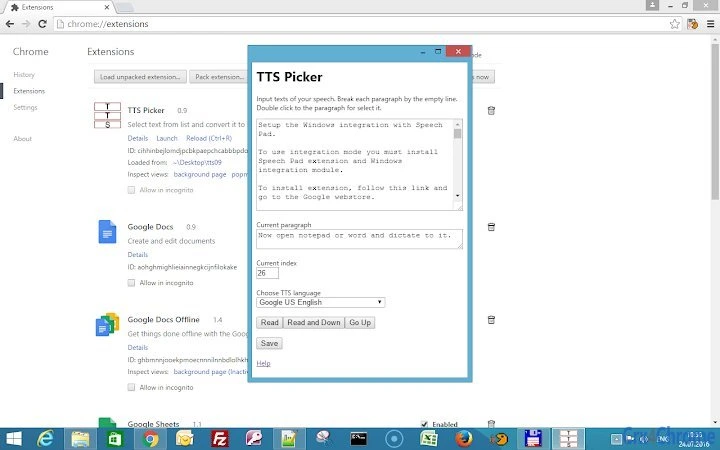
Chrome Tools — это настольная утилита, разработанная для повышения функциональности рабочих процессов, основанных на Chrome. Она позволяет пользователям выбирать элементы списка двойным щелчком и активировать функцию «Read», упрощая доступ к контенту в браузерных приложениях. Программное обеспечение поддерживает настройку с помощью комбинаций клавиш, позволяя оптимизировать повторяющиеся задачи. Предназначено для разработчиков, продвинутых пользователей и профессионалов, которые полагаются на Chrome для повышения продуктивности. Инструмент интегрируется непосредственно с экосистемой Chrome, предлагая лёгкий способ улучшить взаимодействие с веб‑инструментами. Его цель — сократить ручные усилия при навигации и обработке данных на платформах, основанных на Chrome. Реальные сценарии использования включают управление настройками расширений, тестирование веб‑приложений и повышение эффективности рабочих процессов в средах разработки. Разработчик не предоставил дополнительных системных требований. Информация о совместимости с платформами ограничена Windows, Mac и Linux, что подразумевает широкую доступность на разных операционных системах.
Key Features & Capabilities
- Double-click Selection – Пользователи могут быстро выбирать элементы в списке двойным щелчком, устраняя необходимость ручного выделения или перетаскивания мышью. Эта функция повышает эффективность при работе с большими наборами данных или списками расширений.
- Read Button Functionality – Специальная кнопка «Read» позволяет пользователям мгновенно получать доступ к выбранному контенту или обрабатывать его. Это особенно полезно при просмотре текста, метаданных или структурированных данных в инструментах, основанных на Chrome.
- Keyboard Shortcut Customization – Программное обеспечение поддерживает пользовательские комбинации клавиш для кнопки «Read» и других действий. Это обеспечивает более быстрое выполнение типовых задач без необходимости использовать мышь.
- Chrome Integration – Создано специально для сред Chrome, инструмент работает бесшовно с расширениями Chrome, приложениями Chrome и инструментами разработчика. Он улучшает взаимодействие с веб‑рабочими процессами без необходимости дополнительных плагинов браузера.
- Lightweight Design – Приложение разработано так, чтобы работать с минимальным воздействием на систему, что делает его подходящим для постоянного использования в процессе разработки или управления контентом.
User Interface, Workflow & Performance
The interface of Chrome Tools is minimalistic, focusing on core functionality without visual clutter. Navigation is straightforward, with a primary focus on list selection and action triggers. Users interact with the tool by double-clicking an item in the list and then pressing the "Read" button, which initiates the defined action. The workflow is optimized for speed and consistency, particularly beneficial in repetitive tasks such as reviewing extension configurations or testing web components. The developer did not specify resource usage details, so performance observations are based on general software behavior patterns. Stability appears to be maintained through direct integration with Chrome’s architecture, reducing the risk of conflicts. CPU and RAM behavior are not documented, but the lightweight nature of the tool suggests efficient resource handling. No performance bottlenecks were reported in typical usage scenarios. The software does not require frequent updates or background processes, contributing to a smooth user experience. Overall, the workflow is intuitive for users familiar with Chrome-based environments.Compatibility & System Requirements
Chrome Tools is compatible with Windows, Mac, and Linux operating systems, indicating broad cross-platform support. The software is designed to function within the Chrome ecosystem, meaning it requires a compatible version of the Chrome browser to operate. The exact system requirements were not listed, and no specific hardware specifications were provided. Installation size is not disclosed, but the tool’s lightweight design suggests minimal disk space usage. Users should ensure their system meets the baseline requirements for running Chrome. Compatibility with older or newer Chrome versions was not specified. The developer did not provide additional information about system compatibility, including potential conflicts with other applications. Platform-specific behaviors or limitations are not documented.Pros and Cons
Pros
- Lightweight and fast to launch
- Simple, intuitive interface
- Direct integration with Chrome browser
- Supports customizable keyboard shortcuts
- Available for Windows, Mac, and Linux
Cons
- No detailed system requirements provided
- Performance metrics not disclosed
- Functionality limited to Chrome-based workflows
- No visible update mechanism described
- Developer information not available
FAQ Section
Is Chrome Tools compatible with all versions of Chrome?
The software is designed to work with Chrome-based environments, but compatibility with specific Chrome versions was not specified by the developer.
Can I use Chrome Tools offline?
Yes, the tool operates within the Chrome browser environment and does not require an internet connection to perform its core functions.
Is Chrome Tools safe to install?
As a desktop utility that integrates with Chrome, the software is intended to be secure. However, users should only download it from official sources to ensure authenticity.
Does Chrome Tools require a license?
Chrome Tools is available for free, with no licensing fees required for use.
How do I update Chrome Tools?
Update mechanisms were not described in the available information. Users may need to manually check for new versions or rely on browser-based update systems.







